Best Gifts for Remote Workers (2026)

Home office upgrades for remote workers — desk accessories, ergonomic gear, and productivity tools for the WFH crowd.

interest

Prices verified as of

The short answer

The best gifts for remote workers are the AUPSEN Wood Desk Organizer Monitor Stand Riser (which creates desk space and proper screen height at no cost), the Ergodriven Topo Comfort Mat at $119.00 (a standing desk essential), and the Shokz Bone Conduction Headphones at $129.95 (great for calls without blocking ambient sound). If budget allows, the Herman Miller Aeron Chair and Bose QuietComfort 45 headphones are the premium upgrades that actually change how someone works from home.

Gifts for remote workers who actually spend eight hours at a desk

Remote work looks great in theory. No commute, no office politics, total control over your schedule. But after a year or two of working from home, you realize the setup that felt fine at first is quietly wrecking your back. Your colleague needs something that makes the workday less like a physical experiment.

The best remote work gifts solve problems people stopped complaining about. They're not motivational posters or novelty mugs. They're the expensive ergonomic mouse they'd never buy themselves, or the light that stops them squinting at a screen for nine hours straight. Pick something that makes the actual work easier.

Remote workers spend more time in their home offices than most people spend at traditional desks. Finding them something that actually improves that space is the kind of practical thoughtfulness that lands. Here are our picks.

Top picks at a glance

#PickBest forPriceRating
1AUPSEN Wood Desk Organizer Monitor Stand RiserBest overallPrice varies
2Ergodriven Topo Comfort MatBest for standing desks$119.00
3Shokz Bone Conduction HeadphonesBest for call clarity$129.95
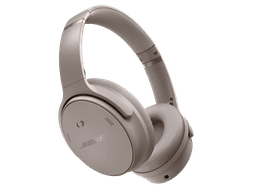
4Bose QuietComfort 45 Noise Cancelling HeadphonesBest noise-canceling$359.00
5Bose SoundLink Flex Bluetooth SpeakerBest for background music$359.00
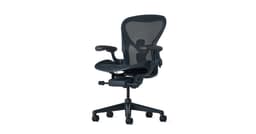
6Herman Miller Aeron Ergonomic ChairBest ergonomic chairPrice varies
7Logitech MX Ergo S Advanced Wireless Trackball MouseBest mouse for wrist painPrice varies
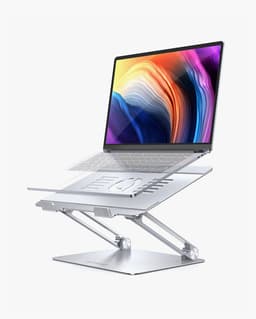
8Lamicall Adjustable Laptop StandBest budget laptop stand$42.39

Our top picks

AUPSEN Wood Desk Organizer Monitor Stand Riser01
Best overall

AUPSEN

AUPSEN Wood Desk Organizer Monitor Stand Riser

Remote workers spend eight hours a day staring at a laptop screen at desk height, which tanks posture and neck strain. This monitor stand solves both problems at once—it elevates the display to eye level while freeing up desk real estate underneath for storage. Your coworker will appreciate the quiet upgrade that actually improves their workday.

  • Lifts screen to ergonomic eye level, reducing neck strain
  • Built-in storage compartment declutters the desk surface
  • Takes up desk footprint; not ideal for small or cramped workspaces
  • Effectiveness depends on having a separate keyboard and mouse setup
Price variesBuy
Ergodriven Topo Comfort Mat02
Best for standing desks

Ergodriven

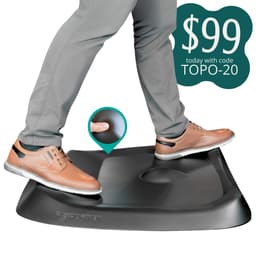
Ergodriven Topo Comfort Mat

Standing desks are great until your feet start hurting. This cushioned mat makes those long stretches at the desk actually tolerable, and it subtly encourages you to shift your weight and move around instead of locking into one position. For a remote worker who's serious about the standing-desk setup but hasn't invested in the comfort layer, it's the practical upgrade that makes the whole thing work.

  • Reduces fatigue from prolonged standing without requiring a full desk overhaul
  • Encourages natural movement and weight shifting during the workday
  • At $119, it's a meaningful add-on cost if the standing desk is already a recent purchase
  • Requires dedicated floor space, which may not be feasible in compact home offices
$119.00Buy
Shokz Bone Conduction Headphones03
Best for call clarity

Shokz

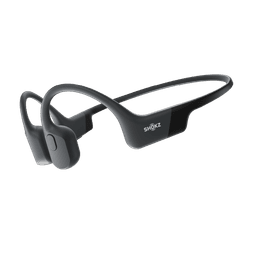
Shokz Bone Conduction Headphones

Remote workers live on calls and Slack, so headphones that let you hear your surroundings are worth their weight. Bone conduction tech delivers solid audio while keeping your ears open—no more missing deliveries, kids, or a colleague dropping by your door. At this price, it's a straightforward upgrade for anyone spending eight hours a day tethered to their desk.

  • Keeps ears free to hear what's happening around you at home.
  • No covering or pressure on ears during long workdays.
  • Bone conduction sound won't match traditional over-ear headphones for audio quality.
  • Open design means less isolation if you need to focus in a noisy household.
$129.95Buy
Bose QuietComfort 45 Noise Cancelling Headphones04
Best noise-canceling

Bose

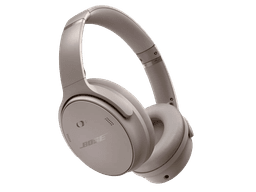
Bose QuietComfort 45 Noise Cancelling Headphones

Anyone working from home knows how hard it is to focus when the rest of the world won't stop. These Bose headphones do the heavy lifting with serious noise cancellation that actually works, making them one of the few gifts a remote worker will reach for every single day. At $359, they're an investment, but they solve a real problem that cheaper alternatives don't.

  • Advanced noise cancellation cuts through distractions and ambient sound effectively
  • Over-ear design built for extended work sessions without constant adjustment
  • $359 price point is steep for a gift unless you know the recipient really wants them
  • Requires active use and charging; battery life matters for all-day WFH wear
$359.00Buy
Bose SoundLink Flex Bluetooth Speaker05
Best for background music

Bose

Bose SoundLink Flex Bluetooth Speaker

Remote workers often turn up the music during breaks or afternoon slumps, but laptop speakers are tinny and desk real estate is precious. This portable Bluetooth speaker delivers solid sound without hogging space, and the water-resistant design means it can survive coffee spills or a move to the kitchen. At $359, it's a premium choice, but the kind of upgrade that actually gets used daily.

  • Water-resistant build handles spills and weather without worry
  • Portable enough to move between desk, patio, and other rooms
  • $359 price point puts it at the high end for a home office accessory
  • Requires Bluetooth pairing setup and proximity to device for playback
$359.00Buy
Herman Miller Aeron Ergonomic Chair06
Best ergonomic chair

Herman Miller

Herman Miller Aeron Ergonomic Chair

If your remote worker is spending eight hours a day in a cheap office chair, their back is probably spending eight hours a day hating them for it. The Aeron is the chair people actually keep for decades—a real investment in not hating where they sit. It's expensive, but it's the kind of upgrade that quietly improves every single workday.

  • Highly adjustable to fit different body types and work styles
  • Built for all-day sitting without the cheap-chair ache
  • Steep price tag puts it out of reach for most gift budgets
  • Requires some adjustment time to dial in the settings properly
Price variesBuy
#7
07
Best mouse for wrist pain

Logitech

Logitech MX Ergo S Advanced Wireless Trackball Mouse

Trackball mice have a learning curve, but once someone makes the switch, they rarely go back. If your remote worker complains about wrist aches or just wants a genuinely different approach to mousing, the MX Ergo S is the kind of upgrade that actually changes how they work. It's built for people who spend eight hours a day pointing and clicking without thinking about it.

  • Reduces wrist strain by keeping your hand still while your thumb does the work
  • Works wirelessly across multiple devices, so it moves seamlessly between laptop and desktop
  • Requires a few days to adjust if you've only ever used a traditional mouse
  • Takes up more desk space than a standard mouse
Price variesBuy
Lamicall Adjustable Laptop Stand08
Best budget laptop stand

Lamicall

Lamicall Adjustable Laptop Stand

Neck pain is the remote worker's dark secret. This stand costs less than a lunch-and-learns subscription but actually fixes the problem: it tilts any laptop up to eye level, so your person stops hunching over their keyboard. At $42, it's an upgrade that pays for itself in comfort within a week.

  • Adjustable to fit multiple laptop sizes and preferred viewing angles
  • Lightweight and portable enough for hot-desking or travel
  • Laptop sits higher, which may require a separate keyboard and mouse to maintain ergonomics
  • Takes up desk real estate and won't help if space is already tight
$42.39Buy
#9
09

Dell

Dell Pro Wireless Headset - WL3024

If your coworker's been squinting at their monitor through a cheap headset, this is the upgrade that actually gets noticed. Dell's on-ear design stays comfortable through eight-hour stretches, and the AI noise cancellation means they'll sound crisp on calls—no apologies about barking dogs or keyboard clatter. It's the kind of practical tool remote workers forget they need until they have it.

  • AI noise cancellation cuts background chatter during calls
  • Wireless range and all-day comfort for back-to-back meetings
  • On-ear style may not suit anyone who prefers over-ear padding for longer sessions
  • Wireless headsets require occasional charging and Bluetooth pairing troubleshooting
Price variesBuy
BenQ ScreenBar Halo10

BenQ

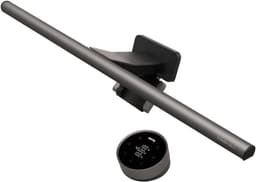
BenQ ScreenBar Halo

Desk lamps are rarely the gift that lands, but this one does the work most people forget they need. A monitor light that clamps directly to the screen, it kills the glare and eye strain that builds up over eight hours of video calls and spreadsheets. Your remote worker won't have to think about it after setup—just set the brightness and color temperature to their preference and move on.

  • Mounts directly to monitor, so no desk real estate required
  • Adjustable lighting reduces eye strain during long screen time
  • Only works if placed behind or attached to a monitor
  • Price point is higher than standard desk lamps
Price variesBuy
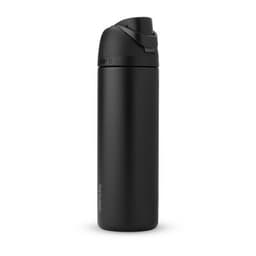
Owala FreeSip Insulated Water Bottle11

Owala

Owala FreeSip Insulated Water Bottle

Most remote workers forget to drink water while heads-down on back-to-back calls. This bottle keeps drinks cold for hours without condensation pooling on your desk, and the FreeSip spout lets you sip without fully committing to a cap twist. It's the kind of thing that vanishes into your routine and actually gets used.

  • Keeps beverages cold for hours without sweating onto your keyboard or desk
  • FreeSip spout design lets you drink with one hand while typing or on video calls
  • Larger format takes up meaningful desk real estate in tight home office setups
  • Double-wall insulation adds weight compared to standard water bottles
Price variesBuy
#12
12

Logitech

Logitech MX Master 3S Wireless Mouse

The mouse is a workhorse for people whose job lives in their cursor. Customizable buttons mean your remote worker can set it up exactly how they use it—reducing friction in their daily work. It's the kind of unglamorous upgrade that pays dividends across eight hours a day, every day.

  • Customizable buttons map to shortcuts and workflows specific to their job
  • Precision scroll wheel handles spreadsheets and long documents faster
  • Premium price point for a mouse—comparable wired alternatives cost much less
  • Requires software setup to unlock full button customization potential
Price variesBuy
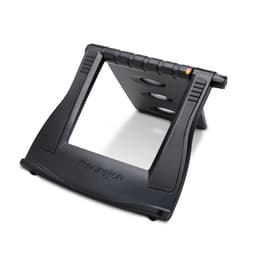
Kensington SmartFit Easy Riser Laptop Cooling Stand13

Kensington

Kensington SmartFit Easy Riser Laptop Cooling Stand

Laptop stands are one of those accessories that sound boring until you actually use one. This Kensington riser tilts the screen up to eye level, which matters after eight hours of hunching, and the open design lets air circulate underneath to keep the machine from throttling. At thirty-seven bucks, it's the kind of upgrade that feels small but changes how someone actually sits at their desk.

  • Lightweight and portable—doesn't add bulk to a work-from-home setup or take up desk real estate when folded away
  • Lifts screen to proper eye level, reducing neck strain during long workdays
  • Requires a separate keyboard and mouse to use effectively, so it's not a complete solution on its own
  • Basic metal design offers no frills or adjustability beyond the fixed angle
$36.99Buy
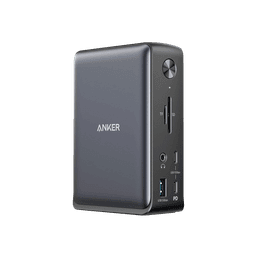
Anker PowerExpand Elite 13-in-1 Thunderbolt 3 Dock14

Anker

Anker PowerExpand Elite 13-in-1 Thunderbolt 3 Dock

A docking station solves one of remote work's core frustrations: juggling cables and adapters every time you move between desk and meeting room. At $199.99, it's a substantial gift, but one that actually reduces daily friction for someone stuck with a single Thunderbolt 3 port on their laptop. Plug in once, and everything else—monitors, external drives, USB peripherals, charging—stays connected and ready.

  • Consolidates 13 ports into one connection, eliminating cable swap-outs throughout the day
  • Charges the laptop while powering external monitors and peripherals simultaneously
  • $200 is steep for a desk accessory; the value hinges entirely on the recipient using external displays or multiple USB devices
  • Requires Thunderbolt 3 on the laptop; won't work with older machines or USB-C-only devices
$199.99Buy
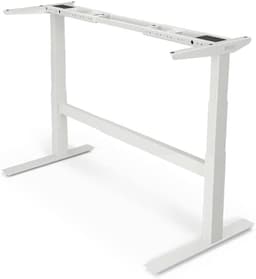
Uplift V2 Standing Desk15

Uplift

Uplift V2 Standing Desk

Most remote workers never leave their chair, and their backs know it. The Uplift V2 lets them shift between sitting and standing throughout the day without replacing their entire desk setup. It's a concrete way to nudge better posture into a workflow that otherwise rewards staying put.

  • Motorized height adjustment lets users switch positions throughout the day without manual effort
  • Promotes healthier posture and reduces strain from prolonged sitting
  • Significant upfront investment compared to standard fixed-height desks
  • Requires proper ergonomic setup with monitor and keyboard placement to deliver real benefits
Price variesBuy
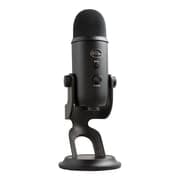
Blue Yeti Nano USB Microphone16

Blue

Blue Yeti Nano USB Microphone

Most remote workers are tired of sounding like they're calling from inside a closet during video calls. The Blue Yeti Nano cuts through that problem with clean, professional audio that actually makes a difference when you're the one presenting or leading the meeting. It's small enough to not dominate a desk, and the setup is genuinely plug-and-play. Your gift-giver instinct here is solid: this is the kind of upgrade that gets used every single day.

  • USB plug-and-play, no software or drivers needed
  • Compact size fits tight desk setups without taking over
  • Only works with USB connection, not wireless or 3.5mm audio jack
  • Needs a boom arm or stand for optimal microphone positioning (not included)
Price variesBuy
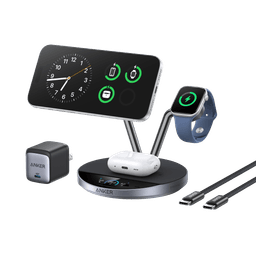
Anker Wireless Charging Station17

Anker

Anker Wireless Charging Station

Cable sprawl is the enemy of a clean desk, and this charging station consolidates the chaos into one compact hub. For someone juggling a laptop, phone, earbuds, and smartwatch throughout the day, it's the kind of practical upgrade that feels small until you actually use it—then you wonder how you lived without it. At $230, it's a meaningful splurge that pays dividends in both desk real estate and daily convenience.

  • Charges multiple devices at once, eliminating the cord tangle under a desk
  • Keeps devices in one place and visible, reducing the hunt for a phone mid-call
  • At $229.99, a premium ask for something that does one job well
  • Requires compatible devices and desk space—not a solution if outlets or room are already tight
$229.99Buy
#18
18

Shokz

Shokz OpenRun Pro Bone Conduction Headphones

Open-ear audio lets your remote worker hear their calls and their surroundings at once—no more yanking off headphones when someone knocks or a delivery arrives. Bone conduction keeps the ears free, which matters when you're in back-to-back meetings and need a break from sealed earpieces pressing against your head all day.

  • Awareness of surroundings while on calls or listening to audio
  • No ear coverage means relief from all-day headphone pressure
  • Bone conduction sound quality trails traditional headphones for music or immersive listening
  • Price point is higher than standard office headphones
Price variesBuy

Frequently Asked Questions

What's a good budget for a remote worker gift?
Somewhere between $40 and $150 hits the sweet spot. That range covers excellent desk fundamentals like the Lamicall Adjustable Laptop Stand at $42, specialty items like the Ergodriven Topo Comfort Mat at $119, and quality audio like Shokz Bone Conduction Headphones at $130. Go higher only if you know their specific pain point really well.
Should I buy them an ergonomic chair?
Only if they don't have one already. The Herman Miller Aeron Ergonomic Chair is the gold standard, but it's a significant investment and a very personal choice. If they already have seating they're happy with, spend the budget on something that layers on top of what they have, like a monitor stand or a quality mouse.
What's the best gift for someone who has everything?
Someone who works from home has the advantage of being incredibly easy to shop for because they probably haven't invested in their workspace properly yet. Look for things that feel like a small luxury they haven't justified buying themselves: the Bose QuietComfort 45 Noise Cancelling Headphones at $359 let them block out distractions, or the BenQ ScreenBar Halo provides specialized task lighting without taking up desk space.
What if they're always on video calls?
Audio quality matters more than you'd think. The Bose SoundLink Flex Bluetooth Speaker at $359 handles background noise better than laptop speakers, but if they're constantly on Zoom, the Dell Pro Wireless Headset WL3024 is designed specifically for that workflow and keeps both hands free for taking notes. Either one signals that you respect their professional presence.
Are there good gifts under $50 for remote workers?
Yes. The AUPSEN Wood Desk Organizer Monitor Stand Riser clears desk space and raises your screen to eye level, which is a genuine posture fix. The Lamicall Adjustable Laptop Stand at $42 solves the same problem and works for anyone switching between laptop and monitor. Both are practical and actually used every day.
What helps with wrist and hand pain from typing?
A quality mouse matters more than people realize. The Logitech MX Master 3S Wireless Mouse is ergonomically designed and reduces strain through precision scrolling and button placement. If they use a trackpad by default, the Logitech MX Ergo S Advanced Wireless Trackball Mouse takes wrist strain out of the equation entirely by using your thumb and hand position instead of repetitive wrist movement.

More Gift Guides